Friday, August 16, 2013
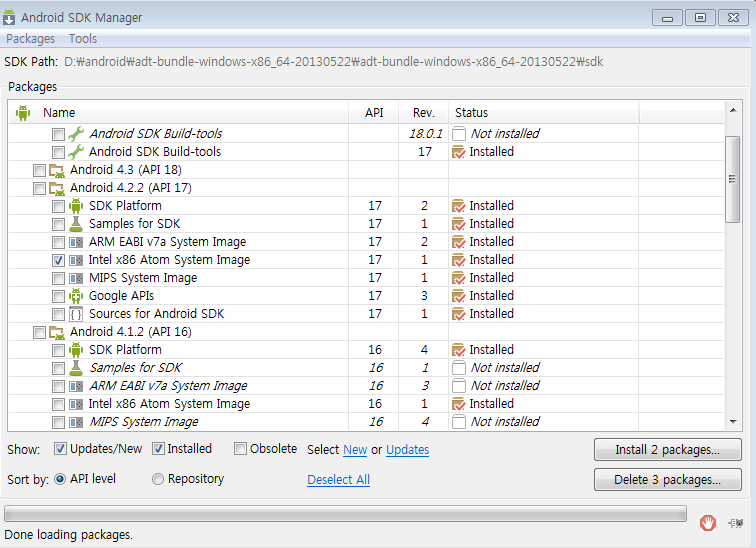
[TIP] Android emulator works nice and fast,
[problem]
On Windows, emulating RAM greater than 768M may fail
depending...
Try proqressively smaller values of RAM if the emulator fails
to launch
[resolved]
install 'Intel x86 Atom System Image'
Tuesday, July 23, 2013
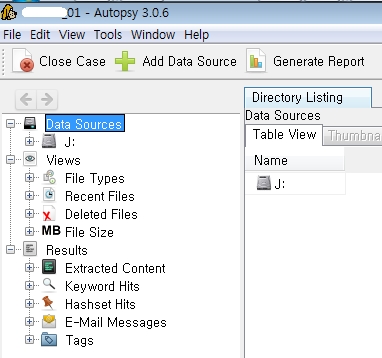
Create an image file and Autopsy...
If you want to get a hard image attaced to the slave, do as follows:
dd if=\\?\Device\Harddisk1\Partition0 of=IMAGE001.img bs=512
Load the image file by Autopsy.
Analyze the image~

슬레이브로 붙인 하드 이미지를 뜨고 싶으면 아래와 같이 하면 된다.
dd if=\\?\Device\Harddisk1\Partition0 of=IMAGE001.img bs=512
그럼 이 이미지 파일을 오토시(autopsy)에 불러들여
포렌식 분석을 하시면 된다.
dd if=\\?\Device\Harddisk1\Partition0 of=IMAGE001.img bs=512
Load the image file by Autopsy.
Analyze the image~

슬레이브로 붙인 하드 이미지를 뜨고 싶으면 아래와 같이 하면 된다.
dd if=\\?\Device\Harddisk1\Partition0 of=IMAGE001.img bs=512
그럼 이 이미지 파일을 오토시(autopsy)에 불러들여
포렌식 분석을 하시면 된다.
Thursday, July 11, 2013
[Tips] Load Symbol
Case 1. code snippet
symPath[] = "symsrv*symsrv.dll*c:\symbol*http://msdl.microsoft.com/download/symbols";
SymInitialize(hProcess, &symPath, TRUE);
http://msdn.microsoft.com/en-us/library/windows/desktop/ms681351(v=vs.85).aspx
Case 2. Using Windbg 1
[File] - [Symbol File Path ...]
enter the symbol
srv*c:\symbol*http://msdl.microsoft.com/download/symbols
Then open an executable or ...
Case 3. Using Windbg 2
open an executable or attach ...
(d4.7f0): Break instruction exception - code 80000003 (first chance)
eax=001a1eb4 ebx=7ffdc000 ecx=00000000 edx=00000001 esi=001a1f48 edi=001a1eb4
eip=7c90120e esp=0007fb20 ebp=0007fc94 iopl=0 nv up ei pl nz na po nc
cs=001b ss=0023 ds=0023 es=0023 fs=003b gs=0000 efl=00000202
ntdll!DbgBreakPoint:
7c90120e cc int 3
0:000> .sympath srv*c:\syms*http://msdl.microsoft.com/download/symbols
Symbol search path is: srv*c:\syms*http://msdl.microsoft.com/download/symbols
Expanded Symbol search path is: srv*c:\syms*http://msdl.microsoft.com/download/symbols
0:000> .reload /f *
심볼 설정할 때 코드로 짜기도 하고 windbg 로 설정하기도 한다.
상황에 맞게 적절히 사용~
symPath[] = "symsrv*symsrv.dll*c:\symbol*http://msdl.microsoft.com/download/symbols";
SymInitialize(hProcess, &symPath, TRUE);
BOOL WINAPI SymInitialize( _In_ HANDLE hProcess, _In_opt_ PCTSTR UserSearchPath, _In_ BOOL fInvadeProcess );
http://msdn.microsoft.com/en-us/library/windows/desktop/ms681351(v=vs.85).aspx
Case 2. Using Windbg 1
[File] - [Symbol File Path ...]
enter the symbol
srv*c:\symbol*http://msdl.microsoft.com/download/symbols
Then open an executable or ...
Setting Symbol and Executable Image Paths in WinDbg
http://msdn.microsoft.com/en-us/library/windows/hardware/hh439335(v=vs.85).aspxCase 3. Using Windbg 2
open an executable or attach ...
(d4.7f0): Break instruction exception - code 80000003 (first chance)
eax=001a1eb4 ebx=7ffdc000 ecx=00000000 edx=00000001 esi=001a1f48 edi=001a1eb4
eip=7c90120e esp=0007fb20 ebp=0007fc94 iopl=0 nv up ei pl nz na po nc
cs=001b ss=0023 ds=0023 es=0023 fs=003b gs=0000 efl=00000202
ntdll!DbgBreakPoint:
7c90120e cc int 3
0:000> .sympath srv*c:\syms*http://msdl.microsoft.com/download/symbols
Symbol search path is: srv*c:\syms*http://msdl.microsoft.com/download/symbols
Expanded Symbol search path is: srv*c:\syms*http://msdl.microsoft.com/download/symbols
0:000> .reload /f *
심볼 설정할 때 코드로 짜기도 하고 windbg 로 설정하기도 한다.
상황에 맞게 적절히 사용~
Friday, July 5, 2013
[Threat] Android Defender
| Symantec | Android.Fakedefender |
Permissions
Activate Device Administrator
- Erase all data
- Change the screen-unlock password
- Set password rules
- Monitor screen-unlock attempts
- Lock the screen
안드로이드용 악성코드 중 재미있는 가짜백신이 발견되었는데
랜섬웨어(ransomware)이며 조치가 까다롭다.
Tuesday, June 25, 2013
[DEV] [TIP] Visual Studio :: Character set error
error C2664: '_stricmp' : cannot convert parameter 1 from 'LPCTSTR' to 'const char *'
This error is caused by Character set. The default character value is "Unicode" running VS 2005 or later
To solve this, change the "character set" field to multibyte
=> project property -> property -> configuration property
비주얼 스튜디오 컴파일할 때 문자열 셋팅 때문에 에러가 나는 경우가 있다.
2005 이상부터는 unicode 문자열로 셋팅되어 있어서 멀티바이트로 셋팅해 주어야
컴파일이 된다.
Thursday, May 30, 2013
MS13-034 [CVE- 2013-1347]
http://blogs.technet.com/b/msrc/archive/2013/05/03/microsoft-releases-security-advisory-2847140.aspx
http://www.cve.mitre.org/cgi-bin/cvename.cgi?name=CVE-2013-1347
Microsoft Internet Explorer 8 does not properly handle objects in memory, which allows remote attackers to execute arbitrary code by accessing an object that was not properly allocated or is deleted, as exploited in the wild in May 2013.
한국의 대부분 사용자들이 IE를 사용하는데 IE 취약점이라 위험성이 크고
이를 이용해 정보유출을 시도하는 케이스들이 발견되고 있으니
반드시 패치를 하시길!
Obfuscated javascript
Decoded javascript
MS IE 8 Vulnerability
http://www.cve.mitre.org/cgi-bin/cvename.cgi?name=CVE-2013-1347
Microsoft Internet Explorer 8 does not properly handle objects in memory, which allows remote attackers to execute arbitrary code by accessing an object that was not properly allocated or is deleted, as exploited in the wild in May 2013.
한국의 대부분 사용자들이 IE를 사용하는데 IE 취약점이라 위험성이 크고
이를 이용해 정보유출을 시도하는 케이스들이 발견되고 있으니
반드시 패치를 하시길!
Obfuscated javascript
Decoded javascript
MS IE 8 Vulnerability
Wednesday, May 29, 2013
Subscribe to:
Posts (Atom)